{
"cells": [
{
"cell_type": "markdown",
"id": "98ee705e",
"metadata": {
"origin_pos": 0
},
"source": [
"# 全卷积网络\n",
":label:`sec_fcn`\n",
"\n",
"如 :numref:`sec_semantic_segmentation`中所介绍的那样,语义分割是对图像中的每个像素分类。\n",
"*全卷积网络*(fully convolutional network,FCN)采用卷积神经网络实现了从图像像素到像素类别的变换 :cite:`Long.Shelhamer.Darrell.2015`。\n",
"与我们之前在图像分类或目标检测部分介绍的卷积神经网络不同,全卷积网络将中间层特征图的高和宽变换回输入图像的尺寸:这是通过在 :numref:`sec_transposed_conv`中引入的*转置卷积*(transposed convolution)实现的。\n",
"因此,输出的类别预测与输入图像在像素级别上具有一一对应关系:通道维的输出即该位置对应像素的类别预测。\n"
]
},
{
"cell_type": "code",
"execution_count": 1,
"id": "9ba53b71",
"metadata": {
"execution": {
"iopub.execute_input": "2023-08-18T07:07:20.570706Z",
"iopub.status.busy": "2023-08-18T07:07:20.570035Z",
"iopub.status.idle": "2023-08-18T07:07:22.638674Z",
"shell.execute_reply": "2023-08-18T07:07:22.637517Z"
},
"origin_pos": 2,
"tab": [
"pytorch"
]
},
"outputs": [],
"source": [
"%matplotlib inline\n",
"import torch\n",
"import torchvision\n",
"from torch import nn\n",
"from torch.nn import functional as F\n",
"from d2l import torch as d2l"
]
},
{
"cell_type": "markdown",
"id": "a6b35251",
"metadata": {
"origin_pos": 4
},
"source": [
"## 构造模型\n",
"\n",
"下面我们了解一下全卷积网络模型最基本的设计。\n",
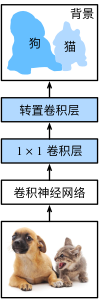
"如 :numref:`fig_fcn`所示,全卷积网络先使用卷积神经网络抽取图像特征,然后通过$1\\times 1$卷积层将通道数变换为类别个数,最后在 :numref:`sec_transposed_conv`中通过转置卷积层将特征图的高和宽变换为输入图像的尺寸。\n",
"因此,模型输出与输入图像的高和宽相同,且最终输出通道包含了该空间位置像素的类别预测。\n",
"\n",
"\n",
":label:`fig_fcn`\n",
"\n",
"下面,我们[**使用在ImageNet数据集上预训练的ResNet-18模型来提取图像特征**],并将该网络记为`pretrained_net`。\n",
"ResNet-18模型的最后几层包括全局平均汇聚层和全连接层,然而全卷积网络中不需要它们。\n"
]
},
{
"cell_type": "code",
"execution_count": 2,
"id": "37e86099",
"metadata": {
"execution": {
"iopub.execute_input": "2023-08-18T07:07:22.642884Z",
"iopub.status.busy": "2023-08-18T07:07:22.642480Z",
"iopub.status.idle": "2023-08-18T07:07:23.298176Z",
"shell.execute_reply": "2023-08-18T07:07:23.297190Z"
},
"origin_pos": 6,
"tab": [
"pytorch"
]
},
"outputs": [
{
"name": "stdout",
"output_type": "stream",
"text": [
"Downloading: \"https://download.pytorch.org/models/resnet18-f37072fd.pth\" to /home/ci/.cache/torch/hub/checkpoints/resnet18-f37072fd.pth\n"
]
},
{
"data": {
"application/json": {
"ascii": false,
"bar_format": null,
"colour": null,
"elapsed": 0.00848388671875,
"initial": 0,
"n": 0,
"ncols": null,
"nrows": null,
"postfix": null,
"prefix": "",
"rate": null,
"total": 46830571,
"unit": "B",
"unit_divisor": 1024,
"unit_scale": true
},
"application/vnd.jupyter.widget-view+json": {
"model_id": "5251df7f557143a6adf3d2225231761b",
"version_major": 2,
"version_minor": 0
},
"text/plain": [
" 0%| | 0.00/44.7M [00:00\n",
"\n",
"\n"
],
"text/plain": [
""
]
},
"metadata": {
"needs_background": "light"
},
"output_type": "display_data"
}
],
"source": [
"d2l.set_figsize()\n",
"print('input image shape:', img.permute(1, 2, 0).shape)\n",
"d2l.plt.imshow(img.permute(1, 2, 0));\n",
"print('output image shape:', out_img.shape)\n",
"d2l.plt.imshow(out_img);"
]
},
{
"cell_type": "markdown",
"id": "e28a121f",
"metadata": {
"origin_pos": 35
},
"source": [
"全卷积网络[**用双线性插值的上采样初始化转置卷积层。对于$1\\times 1$卷积层,我们使用Xavier初始化参数。**]\n"
]
},
{
"cell_type": "code",
"execution_count": 10,
"id": "3607f0c9",
"metadata": {
"execution": {
"iopub.execute_input": "2023-08-18T07:07:24.203681Z",
"iopub.status.busy": "2023-08-18T07:07:24.203097Z",
"iopub.status.idle": "2023-08-18T07:07:24.209142Z",
"shell.execute_reply": "2023-08-18T07:07:24.208048Z"
},
"origin_pos": 37,
"tab": [
"pytorch"
]
},
"outputs": [],
"source": [
"W = bilinear_kernel(num_classes, num_classes, 64)\n",
"net.transpose_conv.weight.data.copy_(W);"
]
},
{
"cell_type": "markdown",
"id": "ff2a5afd",
"metadata": {
"origin_pos": 39
},
"source": [
"## [**读取数据集**]\n",
"\n",
"我们用 :numref:`sec_semantic_segmentation`中介绍的语义分割读取数据集。\n",
"指定随机裁剪的输出图像的形状为$320\\times 480$:高和宽都可以被$32$整除。\n"
]
},
{
"cell_type": "code",
"execution_count": 11,
"id": "ff06cc24",
"metadata": {
"execution": {
"iopub.execute_input": "2023-08-18T07:07:24.213905Z",
"iopub.status.busy": "2023-08-18T07:07:24.213186Z",
"iopub.status.idle": "2023-08-18T07:07:55.535066Z",
"shell.execute_reply": "2023-08-18T07:07:55.534048Z"
},
"origin_pos": 40,
"tab": [
"pytorch"
]
},
"outputs": [
{
"name": "stdout",
"output_type": "stream",
"text": [
"read 1114 examples\n"
]
},
{
"name": "stdout",
"output_type": "stream",
"text": [
"read 1078 examples\n"
]
}
],
"source": [
"batch_size, crop_size = 32, (320, 480)\n",
"train_iter, test_iter = d2l.load_data_voc(batch_size, crop_size)"
]
},
{
"cell_type": "markdown",
"id": "79c83844",
"metadata": {
"origin_pos": 42
},
"source": [
"## [**训练**]\n",
"\n",
"现在我们可以训练全卷积网络了。\n",
"这里的损失函数和准确率计算与图像分类中的并没有本质上的不同,因为我们使用转置卷积层的通道来预测像素的类别,所以需要在损失计算中指定通道维。\n",
"此外,模型基于每个像素的预测类别是否正确来计算准确率。\n"
]
},
{
"cell_type": "code",
"execution_count": 12,
"id": "244b4702",
"metadata": {
"execution": {
"iopub.execute_input": "2023-08-18T07:07:55.540275Z",
"iopub.status.busy": "2023-08-18T07:07:55.539598Z",
"iopub.status.idle": "2023-08-18T07:08:45.398121Z",
"shell.execute_reply": "2023-08-18T07:08:45.397216Z"
},
"origin_pos": 44,
"tab": [
"pytorch"
]
},
"outputs": [
{
"name": "stdout",
"output_type": "stream",
"text": [
"loss 0.443, train acc 0.863, test acc 0.848\n",
"254.0 examples/sec on [device(type='cuda', index=0), device(type='cuda', index=1)]\n"
]
},
{
"data": {
"image/svg+xml": [
"\n",
"\n",
"\n"
],
"text/plain": [
""
]
},
"metadata": {
"needs_background": "light"
},
"output_type": "display_data"
}
],
"source": [
"def loss(inputs, targets):\n",
" return F.cross_entropy(inputs, targets, reduction='none').mean(1).mean(1)\n",
"\n",
"num_epochs, lr, wd, devices = 5, 0.001, 1e-3, d2l.try_all_gpus()\n",
"trainer = torch.optim.SGD(net.parameters(), lr=lr, weight_decay=wd)\n",
"d2l.train_ch13(net, train_iter, test_iter, loss, trainer, num_epochs, devices)"
]
},
{
"cell_type": "markdown",
"id": "8bcb8df5",
"metadata": {
"origin_pos": 46
},
"source": [
"## [**预测**]\n",
"\n",
"在预测时,我们需要将输入图像在各个通道做标准化,并转成卷积神经网络所需要的四维输入格式。\n"
]
},
{
"cell_type": "code",
"execution_count": 13,
"id": "bdb803a3",
"metadata": {
"execution": {
"iopub.execute_input": "2023-08-18T07:08:45.402153Z",
"iopub.status.busy": "2023-08-18T07:08:45.401873Z",
"iopub.status.idle": "2023-08-18T07:08:45.406358Z",
"shell.execute_reply": "2023-08-18T07:08:45.405611Z"
},
"origin_pos": 48,
"tab": [
"pytorch"
]
},
"outputs": [],
"source": [
"def predict(img):\n",
" X = test_iter.dataset.normalize_image(img).unsqueeze(0)\n",
" pred = net(X.to(devices[0])).argmax(dim=1)\n",
" return pred.reshape(pred.shape[1], pred.shape[2])"
]
},
{
"cell_type": "markdown",
"id": "54d2aa8a",
"metadata": {
"origin_pos": 50
},
"source": [
"为了[**可视化预测的类别**]给每个像素,我们将预测类别映射回它们在数据集中的标注颜色。\n"
]
},
{
"cell_type": "code",
"execution_count": 14,
"id": "27e3aa15",
"metadata": {
"execution": {
"iopub.execute_input": "2023-08-18T07:08:45.409772Z",
"iopub.status.busy": "2023-08-18T07:08:45.409264Z",
"iopub.status.idle": "2023-08-18T07:08:45.413358Z",
"shell.execute_reply": "2023-08-18T07:08:45.412563Z"
},
"origin_pos": 52,
"tab": [
"pytorch"
]
},
"outputs": [],
"source": [
"def label2image(pred):\n",
" colormap = torch.tensor(d2l.VOC_COLORMAP, device=devices[0])\n",
" X = pred.long()\n",
" return colormap[X, :]"
]
},
{
"cell_type": "markdown",
"id": "e3a9d039",
"metadata": {
"origin_pos": 54
},
"source": [
"测试数据集中的图像大小和形状各异。\n",
"由于模型使用了步幅为32的转置卷积层,因此当输入图像的高或宽无法被32整除时,转置卷积层输出的高或宽会与输入图像的尺寸有偏差。\n",
"为了解决这个问题,我们可以在图像中截取多块高和宽为32的整数倍的矩形区域,并分别对这些区域中的像素做前向传播。\n",
"请注意,这些区域的并集需要完整覆盖输入图像。\n",
"当一个像素被多个区域所覆盖时,它在不同区域前向传播中转置卷积层输出的平均值可以作为`softmax`运算的输入,从而预测类别。\n",
"\n",
"为简单起见,我们只读取几张较大的测试图像,并从图像的左上角开始截取形状为$320\\times480$的区域用于预测。\n",
"对于这些测试图像,我们逐一打印它们截取的区域,再打印预测结果,最后打印标注的类别。\n"
]
},
{
"cell_type": "code",
"execution_count": 15,
"id": "f0f8cff8",
"metadata": {
"execution": {
"iopub.execute_input": "2023-08-18T07:08:45.416847Z",
"iopub.status.busy": "2023-08-18T07:08:45.416234Z",
"iopub.status.idle": "2023-08-18T07:09:10.704851Z",
"shell.execute_reply": "2023-08-18T07:09:10.704050Z"
},
"origin_pos": 56,
"tab": [
"pytorch"
]
},
"outputs": [
{
"data": {
"image/svg+xml": [
"\n",
"\n",
"\n"
],
"text/plain": [
""
]
},
"metadata": {
"needs_background": "light"
},
"output_type": "display_data"
}
],
"source": [
"voc_dir = d2l.download_extract('voc2012', 'VOCdevkit/VOC2012')\n",
"test_images, test_labels = d2l.read_voc_images(voc_dir, False)\n",
"n, imgs = 4, []\n",
"for i in range(n):\n",
" crop_rect = (0, 0, 320, 480)\n",
" X = torchvision.transforms.functional.crop(test_images[i], *crop_rect)\n",
" pred = label2image(predict(X))\n",
" imgs += [X.permute(1,2,0), pred.cpu(),\n",
" torchvision.transforms.functional.crop(\n",
" test_labels[i], *crop_rect).permute(1,2,0)]\n",
"d2l.show_images(imgs[::3] + imgs[1::3] + imgs[2::3], 3, n, scale=2);"
]
},
{
"cell_type": "markdown",
"id": "b82349b4",
"metadata": {
"origin_pos": 58
},
"source": [
"## 小结\n",
"\n",
"* 全卷积网络先使用卷积神经网络抽取图像特征,然后通过$1\\times 1$卷积层将通道数变换为类别个数,最后通过转置卷积层将特征图的高和宽变换为输入图像的尺寸。\n",
"* 在全卷积网络中,我们可以将转置卷积层初始化为双线性插值的上采样。\n",
"\n",
"## 练习\n",
"\n",
"1. 如果将转置卷积层改用Xavier随机初始化,结果有什么变化?\n",
"1. 调节超参数,能进一步提升模型的精度吗?\n",
"1. 预测测试图像中所有像素的类别。\n",
"1. 最初的全卷积网络的论文中 :cite:`Long.Shelhamer.Darrell.2015`还使用了某些卷积神经网络中间层的输出。试着实现这个想法。\n"
]
},
{
"cell_type": "markdown",
"id": "314d9c7f",
"metadata": {
"origin_pos": 60,
"tab": [
"pytorch"
]
},
"source": [
"[Discussions](https://discuss.d2l.ai/t/3297)\n"
]
}
],
"metadata": {
"language_info": {
"name": "python"
},
"required_libs": [],
"widgets": {
"application/vnd.jupyter.widget-state+json": {
"state": {
"1a2196f22729431f83d039862392acc0": {
"model_module": "@jupyter-widgets/controls",
"model_module_version": "2.0.0",
"model_name": "FloatProgressModel",
"state": {
"_dom_classes": [],
"_model_module": "@jupyter-widgets/controls",
"_model_module_version": "2.0.0",
"_model_name": "FloatProgressModel",
"_view_count": null,
"_view_module": "@jupyter-widgets/controls",
"_view_module_version": "2.0.0",
"_view_name": "ProgressView",
"bar_style": "success",
"description": "",
"description_allow_html": false,
"layout": "IPY_MODEL_d19858e45b944e8c8f9059db20975b35",
"max": 46830571.0,
"min": 0.0,
"orientation": "horizontal",
"style": "IPY_MODEL_8734c89a8ec0418fb79ebae7cb29e024",
"tabbable": null,
"tooltip": null,
"value": 46830571.0
}
},
"5251df7f557143a6adf3d2225231761b": {
"model_module": "@jupyter-widgets/controls",
"model_module_version": "2.0.0",
"model_name": "HBoxModel",
"state": {
"_dom_classes": [],
"_model_module": "@jupyter-widgets/controls",
"_model_module_version": "2.0.0",
"_model_name": "HBoxModel",
"_view_count": null,
"_view_module": "@jupyter-widgets/controls",
"_view_module_version": "2.0.0",
"_view_name": "HBoxView",
"box_style": "",
"children": [
"IPY_MODEL_7cb4d17593b14ecbb1faa48dd9cfa341",
"IPY_MODEL_1a2196f22729431f83d039862392acc0",
"IPY_MODEL_a3afec78bd61439f8ac2cb8cd21ec2a7"
],
"layout": "IPY_MODEL_eadd40b78048487882acca1c18a48abb",
"tabbable": null,
"tooltip": null
}
},
"56a96b11f6874202b0c125339b47a25f": {
"model_module": "@jupyter-widgets/controls",
"model_module_version": "2.0.0",
"model_name": "HTMLStyleModel",
"state": {
"_model_module": "@jupyter-widgets/controls",
"_model_module_version": "2.0.0",
"_model_name": "HTMLStyleModel",
"_view_count": null,
"_view_module": "@jupyter-widgets/base",
"_view_module_version": "2.0.0",
"_view_name": "StyleView",
"background": null,
"description_width": "",
"font_size": null,
"text_color": null
}
},
"7cb4d17593b14ecbb1faa48dd9cfa341": {
"model_module": "@jupyter-widgets/controls",
"model_module_version": "2.0.0",
"model_name": "HTMLModel",
"state": {
"_dom_classes": [],
"_model_module": "@jupyter-widgets/controls",
"_model_module_version": "2.0.0",
"_model_name": "HTMLModel",
"_view_count": null,
"_view_module": "@jupyter-widgets/controls",
"_view_module_version": "2.0.0",
"_view_name": "HTMLView",
"description": "",
"description_allow_html": false,
"layout": "IPY_MODEL_9741cfd24c0c4bdb9f733551ad298ce4",
"placeholder": "",
"style": "IPY_MODEL_7e79ccfb796b4045abce79262f800cda",
"tabbable": null,
"tooltip": null,
"value": "100%"
}
},
"7e79ccfb796b4045abce79262f800cda": {
"model_module": "@jupyter-widgets/controls",
"model_module_version": "2.0.0",
"model_name": "HTMLStyleModel",
"state": {
"_model_module": "@jupyter-widgets/controls",
"_model_module_version": "2.0.0",
"_model_name": "HTMLStyleModel",
"_view_count": null,
"_view_module": "@jupyter-widgets/base",
"_view_module_version": "2.0.0",
"_view_name": "StyleView",
"background": null,
"description_width": "",
"font_size": null,
"text_color": null
}
},
"8734c89a8ec0418fb79ebae7cb29e024": {
"model_module": "@jupyter-widgets/controls",
"model_module_version": "2.0.0",
"model_name": "ProgressStyleModel",
"state": {
"_model_module": "@jupyter-widgets/controls",
"_model_module_version": "2.0.0",
"_model_name": "ProgressStyleModel",
"_view_count": null,
"_view_module": "@jupyter-widgets/base",
"_view_module_version": "2.0.0",
"_view_name": "StyleView",
"bar_color": null,
"description_width": ""
}
},
"886e463378e84ac29c4788e4908e8a70": {
"model_module": "@jupyter-widgets/base",
"model_module_version": "2.0.0",
"model_name": "LayoutModel",
"state": {
"_model_module": "@jupyter-widgets/base",
"_model_module_version": "2.0.0",
"_model_name": "LayoutModel",
"_view_count": null,
"_view_module": "@jupyter-widgets/base",
"_view_module_version": "2.0.0",
"_view_name": "LayoutView",
"align_content": null,
"align_items": null,
"align_self": null,
"border_bottom": null,
"border_left": null,
"border_right": null,
"border_top": null,
"bottom": null,
"display": null,
"flex": null,
"flex_flow": null,
"grid_area": null,
"grid_auto_columns": null,
"grid_auto_flow": null,
"grid_auto_rows": null,
"grid_column": null,
"grid_gap": null,
"grid_row": null,
"grid_template_areas": null,
"grid_template_columns": null,
"grid_template_rows": null,
"height": null,
"justify_content": null,
"justify_items": null,
"left": null,
"margin": null,
"max_height": null,
"max_width": null,
"min_height": null,
"min_width": null,
"object_fit": null,
"object_position": null,
"order": null,
"overflow": null,
"padding": null,
"right": null,
"top": null,
"visibility": null,
"width": null
}
},
"9741cfd24c0c4bdb9f733551ad298ce4": {
"model_module": "@jupyter-widgets/base",
"model_module_version": "2.0.0",
"model_name": "LayoutModel",
"state": {
"_model_module": "@jupyter-widgets/base",
"_model_module_version": "2.0.0",
"_model_name": "LayoutModel",
"_view_count": null,
"_view_module": "@jupyter-widgets/base",
"_view_module_version": "2.0.0",
"_view_name": "LayoutView",
"align_content": null,
"align_items": null,
"align_self": null,
"border_bottom": null,
"border_left": null,
"border_right": null,
"border_top": null,
"bottom": null,
"display": null,
"flex": null,
"flex_flow": null,
"grid_area": null,
"grid_auto_columns": null,
"grid_auto_flow": null,
"grid_auto_rows": null,
"grid_column": null,
"grid_gap": null,
"grid_row": null,
"grid_template_areas": null,
"grid_template_columns": null,
"grid_template_rows": null,
"height": null,
"justify_content": null,
"justify_items": null,
"left": null,
"margin": null,
"max_height": null,
"max_width": null,
"min_height": null,
"min_width": null,
"object_fit": null,
"object_position": null,
"order": null,
"overflow": null,
"padding": null,
"right": null,
"top": null,
"visibility": null,
"width": null
}
},
"a3afec78bd61439f8ac2cb8cd21ec2a7": {
"model_module": "@jupyter-widgets/controls",
"model_module_version": "2.0.0",
"model_name": "HTMLModel",
"state": {
"_dom_classes": [],
"_model_module": "@jupyter-widgets/controls",
"_model_module_version": "2.0.0",
"_model_name": "HTMLModel",
"_view_count": null,
"_view_module": "@jupyter-widgets/controls",
"_view_module_version": "2.0.0",
"_view_name": "HTMLView",
"description": "",
"description_allow_html": false,
"layout": "IPY_MODEL_886e463378e84ac29c4788e4908e8a70",
"placeholder": "",
"style": "IPY_MODEL_56a96b11f6874202b0c125339b47a25f",
"tabbable": null,
"tooltip": null,
"value": " 44.7M/44.7M [00:00<00:00, 163MB/s]"
}
},
"d19858e45b944e8c8f9059db20975b35": {
"model_module": "@jupyter-widgets/base",
"model_module_version": "2.0.0",
"model_name": "LayoutModel",
"state": {
"_model_module": "@jupyter-widgets/base",
"_model_module_version": "2.0.0",
"_model_name": "LayoutModel",
"_view_count": null,
"_view_module": "@jupyter-widgets/base",
"_view_module_version": "2.0.0",
"_view_name": "LayoutView",
"align_content": null,
"align_items": null,
"align_self": null,
"border_bottom": null,
"border_left": null,
"border_right": null,
"border_top": null,
"bottom": null,
"display": null,
"flex": null,
"flex_flow": null,
"grid_area": null,
"grid_auto_columns": null,
"grid_auto_flow": null,
"grid_auto_rows": null,
"grid_column": null,
"grid_gap": null,
"grid_row": null,
"grid_template_areas": null,
"grid_template_columns": null,
"grid_template_rows": null,
"height": null,
"justify_content": null,
"justify_items": null,
"left": null,
"margin": null,
"max_height": null,
"max_width": null,
"min_height": null,
"min_width": null,
"object_fit": null,
"object_position": null,
"order": null,
"overflow": null,
"padding": null,
"right": null,
"top": null,
"visibility": null,
"width": null
}
},
"eadd40b78048487882acca1c18a48abb": {
"model_module": "@jupyter-widgets/base",
"model_module_version": "2.0.0",
"model_name": "LayoutModel",
"state": {
"_model_module": "@jupyter-widgets/base",
"_model_module_version": "2.0.0",
"_model_name": "LayoutModel",
"_view_count": null,
"_view_module": "@jupyter-widgets/base",
"_view_module_version": "2.0.0",
"_view_name": "LayoutView",
"align_content": null,
"align_items": null,
"align_self": null,
"border_bottom": null,
"border_left": null,
"border_right": null,
"border_top": null,
"bottom": null,
"display": null,
"flex": null,
"flex_flow": null,
"grid_area": null,
"grid_auto_columns": null,
"grid_auto_flow": null,
"grid_auto_rows": null,
"grid_column": null,
"grid_gap": null,
"grid_row": null,
"grid_template_areas": null,
"grid_template_columns": null,
"grid_template_rows": null,
"height": null,
"justify_content": null,
"justify_items": null,
"left": null,
"margin": null,
"max_height": null,
"max_width": null,
"min_height": null,
"min_width": null,
"object_fit": null,
"object_position": null,
"order": null,
"overflow": null,
"padding": null,
"right": null,
"top": null,
"visibility": null,
"width": null
}
}
},
"version_major": 2,
"version_minor": 0
}
}
},
"nbformat": 4,
"nbformat_minor": 5
}