{
"cells": [
{
"cell_type": "markdown",
"id": "06c5b1d6",
"metadata": {
"origin_pos": 0
},
"source": [
"# 实战Kaggle比赛:狗的品种识别(ImageNet Dogs)\n",
"\n",
"本节我们将在Kaggle上实战狗品种识别问题。\n",
"本次(**比赛网址是https://www.kaggle.com/c/dog-breed-identification**)。\n",
" :numref:`fig_kaggle_dog`显示了鉴定比赛网页上的信息。\n",
"需要一个Kaggle账户才能提交结果。\n",
"\n",
"在这场比赛中,我们将识别120类不同品种的狗。\n",
"这个数据集实际上是著名的ImageNet的数据集子集。与 :numref:`sec_kaggle_cifar10`中CIFAR-10数据集中的图像不同,\n",
"ImageNet数据集中的图像更高更宽,且尺寸不一。\n",
"\n",
"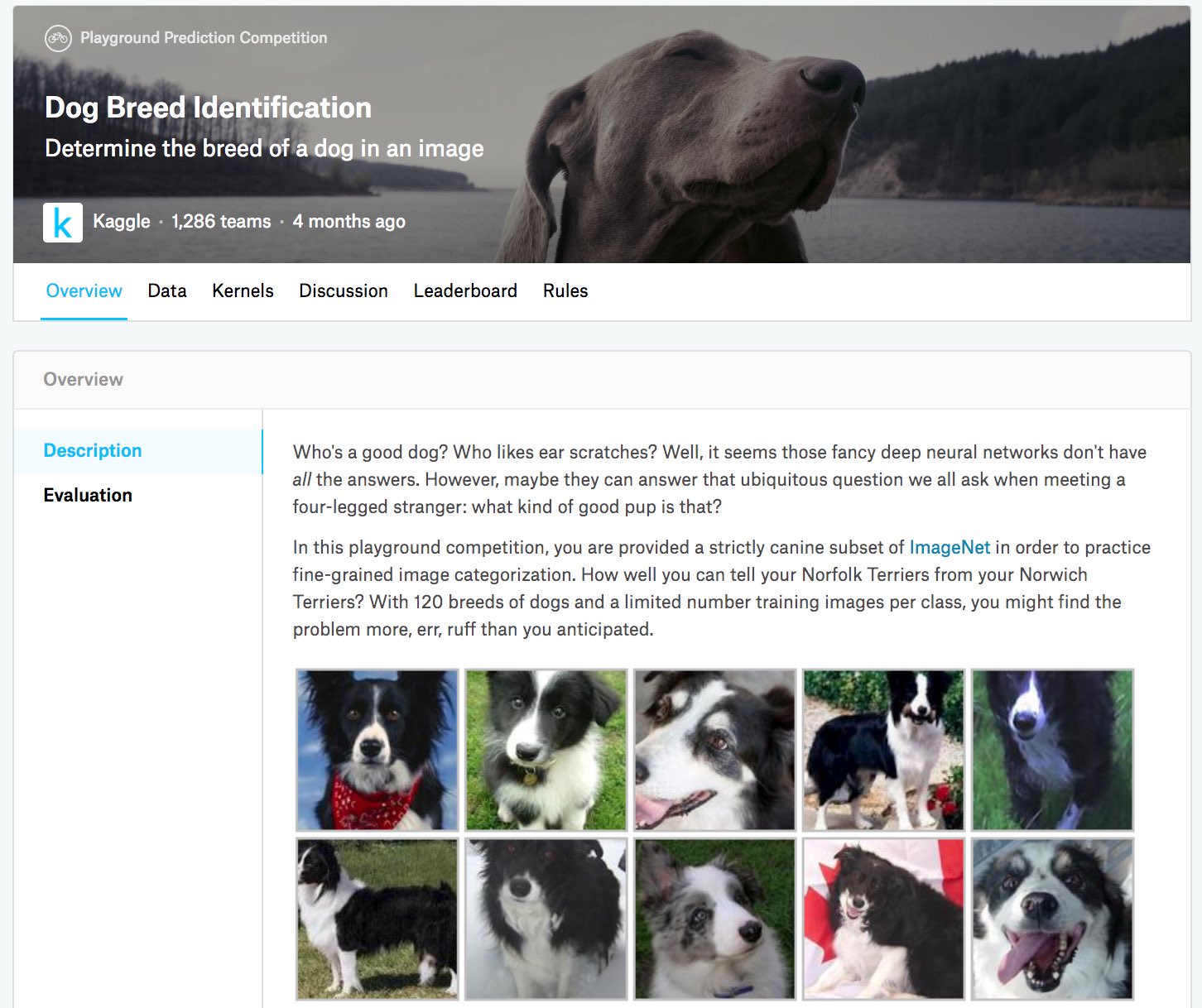\n",
":width:`400px`\n",
":label:`fig_kaggle_dog`\n"
]
},
{
"cell_type": "code",
"execution_count": 1,
"id": "b6e1a2a2",
"metadata": {
"execution": {
"iopub.execute_input": "2023-08-18T06:58:14.555794Z",
"iopub.status.busy": "2023-08-18T06:58:14.555246Z",
"iopub.status.idle": "2023-08-18T06:58:16.563976Z",
"shell.execute_reply": "2023-08-18T06:58:16.563095Z"
},
"origin_pos": 2,
"tab": [
"pytorch"
]
},
"outputs": [],
"source": [
"import os\n",
"import torch\n",
"import torchvision\n",
"from torch import nn\n",
"from d2l import torch as d2l"
]
},
{
"cell_type": "markdown",
"id": "13880384",
"metadata": {
"origin_pos": 4
},
"source": [
"## 获取和整理数据集\n",
"\n",
"比赛数据集分为训练集和测试集,分别包含RGB(彩色)通道的10222张、10357张JPEG图像。\n",
"在训练数据集中,有120种犬类,如拉布拉多、贵宾、腊肠、萨摩耶、哈士奇、吉娃娃和约克夏等。\n",
"\n",
"### 下载数据集\n",
"\n",
"登录Kaggle后,可以点击 :numref:`fig_kaggle_dog`中显示的竞争网页上的“数据”选项卡,然后点击“全部下载”按钮下载数据集。在`../data`中解压下载的文件后,将在以下路径中找到整个数据集:\n",
"\n",
"* ../data/dog-breed-identification/labels.csv\n",
"* ../data/dog-breed-identification/sample_submission.csv\n",
"* ../data/dog-breed-identification/train\n",
"* ../data/dog-breed-identification/test\n",
"\n",
"\n",
"上述结构与 :numref:`sec_kaggle_cifar10`的CIFAR-10类似,其中文件夹`train/`和`test/`分别包含训练和测试狗图像,`labels.csv`包含训练图像的标签。\n",
"\n",
"同样,为了便于入门,[**我们提供完整数据集的小规模样本**]:`train_valid_test_tiny.zip`。\n",
"如果要在Kaggle比赛中使用完整的数据集,则需要将下面的`demo`变量更改为`False`。\n"
]
},
{
"cell_type": "code",
"execution_count": 2,
"id": "9ecb1309",
"metadata": {
"execution": {
"iopub.execute_input": "2023-08-18T06:58:16.567802Z",
"iopub.status.busy": "2023-08-18T06:58:16.567412Z",
"iopub.status.idle": "2023-08-18T06:58:17.348683Z",
"shell.execute_reply": "2023-08-18T06:58:17.347865Z"
},
"origin_pos": 5,
"tab": [
"pytorch"
]
},
"outputs": [
{
"name": "stdout",
"output_type": "stream",
"text": [
"Downloading ../data/kaggle_dog_tiny.zip from http://d2l-data.s3-accelerate.amazonaws.com/kaggle_dog_tiny.zip...\n"
]
}
],
"source": [
"#@save\n",
"d2l.DATA_HUB['dog_tiny'] = (d2l.DATA_URL + 'kaggle_dog_tiny.zip',\n",
" '0cb91d09b814ecdc07b50f31f8dcad3e81d6a86d')\n",
"\n",
"# 如果使用Kaggle比赛的完整数据集,请将下面的变量更改为False\n",
"demo = True\n",
"if demo:\n",
" data_dir = d2l.download_extract('dog_tiny')\n",
"else:\n",
" data_dir = os.path.join('..', 'data', 'dog-breed-identification')"
]
},
{
"cell_type": "markdown",
"id": "be63041f",
"metadata": {
"origin_pos": 6
},
"source": [
"### [**整理数据集**]\n",
"\n",
"我们可以像 :numref:`sec_kaggle_cifar10`中所做的那样整理数据集,即从原始训练集中拆分验证集,然后将图像移动到按标签分组的子文件夹中。\n",
"\n",
"下面的`reorg_dog_data`函数读取训练数据标签、拆分验证集并整理训练集。\n"
]
},
{
"cell_type": "code",
"execution_count": 3,
"id": "3b420853",
"metadata": {
"execution": {
"iopub.execute_input": "2023-08-18T06:58:17.352573Z",
"iopub.status.busy": "2023-08-18T06:58:17.352101Z",
"iopub.status.idle": "2023-08-18T06:58:17.685237Z",
"shell.execute_reply": "2023-08-18T06:58:17.683473Z"
},
"origin_pos": 7,
"tab": [
"pytorch"
]
},
"outputs": [],
"source": [
"def reorg_dog_data(data_dir, valid_ratio):\n",
" labels = d2l.read_csv_labels(os.path.join(data_dir, 'labels.csv'))\n",
" d2l.reorg_train_valid(data_dir, labels, valid_ratio)\n",
" d2l.reorg_test(data_dir)\n",
"\n",
"\n",
"batch_size = 32 if demo else 128\n",
"valid_ratio = 0.1\n",
"reorg_dog_data(data_dir, valid_ratio)"
]
},
{
"cell_type": "markdown",
"id": "7e0ef8e3",
"metadata": {
"origin_pos": 8
},
"source": [
"## [**图像增广**]\n",
"\n",
"回想一下,这个狗品种数据集是ImageNet数据集的子集,其图像大于 :numref:`sec_kaggle_cifar10`中CIFAR-10数据集的图像。\n",
"下面我们看一下如何在相对较大的图像上使用图像增广。\n"
]
},
{
"cell_type": "code",
"execution_count": 4,
"id": "7dd17ade",
"metadata": {
"execution": {
"iopub.execute_input": "2023-08-18T06:58:17.691169Z",
"iopub.status.busy": "2023-08-18T06:58:17.690438Z",
"iopub.status.idle": "2023-08-18T06:58:17.698895Z",
"shell.execute_reply": "2023-08-18T06:58:17.697847Z"
},
"origin_pos": 10,
"tab": [
"pytorch"
]
},
"outputs": [],
"source": [
"transform_train = torchvision.transforms.Compose([\n",
" # 随机裁剪图像,所得图像为原始面积的0.08~1之间,高宽比在3/4和4/3之间。\n",
" # 然后,缩放图像以创建224x224的新图像\n",
" torchvision.transforms.RandomResizedCrop(224, scale=(0.08, 1.0),\n",
" ratio=(3.0/4.0, 4.0/3.0)),\n",
" torchvision.transforms.RandomHorizontalFlip(),\n",
" # 随机更改亮度,对比度和饱和度\n",
" torchvision.transforms.ColorJitter(brightness=0.4,\n",
" contrast=0.4,\n",
" saturation=0.4),\n",
" # 添加随机噪声\n",
" torchvision.transforms.ToTensor(),\n",
" # 标准化图像的每个通道\n",
" torchvision.transforms.Normalize([0.485, 0.456, 0.406],\n",
" [0.229, 0.224, 0.225])])"
]
},
{
"cell_type": "markdown",
"id": "f1657506",
"metadata": {
"origin_pos": 12
},
"source": [
"测试时,我们只使用确定性的图像预处理操作。\n"
]
},
{
"cell_type": "code",
"execution_count": 5,
"id": "0b467084",
"metadata": {
"execution": {
"iopub.execute_input": "2023-08-18T06:58:17.704258Z",
"iopub.status.busy": "2023-08-18T06:58:17.703547Z",
"iopub.status.idle": "2023-08-18T06:58:17.710398Z",
"shell.execute_reply": "2023-08-18T06:58:17.709360Z"
},
"origin_pos": 14,
"tab": [
"pytorch"
]
},
"outputs": [],
"source": [
"transform_test = torchvision.transforms.Compose([\n",
" torchvision.transforms.Resize(256),\n",
" # 从图像中心裁切224x224大小的图片\n",
" torchvision.transforms.CenterCrop(224),\n",
" torchvision.transforms.ToTensor(),\n",
" torchvision.transforms.Normalize([0.485, 0.456, 0.406],\n",
" [0.229, 0.224, 0.225])])"
]
},
{
"cell_type": "markdown",
"id": "9c375dab",
"metadata": {
"origin_pos": 16
},
"source": [
"## [**读取数据集**]\n",
"\n",
"与 :numref:`sec_kaggle_cifar10`一样,我们可以读取整理后的含原始图像文件的数据集。\n"
]
},
{
"cell_type": "code",
"execution_count": 6,
"id": "bc8d11c0",
"metadata": {
"execution": {
"iopub.execute_input": "2023-08-18T06:58:17.715826Z",
"iopub.status.busy": "2023-08-18T06:58:17.715055Z",
"iopub.status.idle": "2023-08-18T06:58:17.750393Z",
"shell.execute_reply": "2023-08-18T06:58:17.749301Z"
},
"origin_pos": 18,
"tab": [
"pytorch"
]
},
"outputs": [],
"source": [
"train_ds, train_valid_ds = [torchvision.datasets.ImageFolder(\n",
" os.path.join(data_dir, 'train_valid_test', folder),\n",
" transform=transform_train) for folder in ['train', 'train_valid']]\n",
"\n",
"valid_ds, test_ds = [torchvision.datasets.ImageFolder(\n",
" os.path.join(data_dir, 'train_valid_test', folder),\n",
" transform=transform_test) for folder in ['valid', 'test']]"
]
},
{
"cell_type": "markdown",
"id": "cb0b1b9e",
"metadata": {
"origin_pos": 20
},
"source": [
"下面我们创建数据加载器实例的方式与 :numref:`sec_kaggle_cifar10`相同。\n"
]
},
{
"cell_type": "code",
"execution_count": 7,
"id": "8ef84d02",
"metadata": {
"execution": {
"iopub.execute_input": "2023-08-18T06:58:17.756485Z",
"iopub.status.busy": "2023-08-18T06:58:17.755671Z",
"iopub.status.idle": "2023-08-18T06:58:17.764122Z",
"shell.execute_reply": "2023-08-18T06:58:17.762916Z"
},
"origin_pos": 22,
"tab": [
"pytorch"
]
},
"outputs": [],
"source": [
"train_iter, train_valid_iter = [torch.utils.data.DataLoader(\n",
" dataset, batch_size, shuffle=True, drop_last=True)\n",
" for dataset in (train_ds, train_valid_ds)]\n",
"\n",
"valid_iter = torch.utils.data.DataLoader(valid_ds, batch_size, shuffle=False,\n",
" drop_last=True)\n",
"\n",
"test_iter = torch.utils.data.DataLoader(test_ds, batch_size, shuffle=False,\n",
" drop_last=False)"
]
},
{
"cell_type": "markdown",
"id": "78c1647e",
"metadata": {
"origin_pos": 24
},
"source": [
"## [**微调预训练模型**]\n",
"\n",
"同样,本次比赛的数据集是ImageNet数据集的子集。\n",
"因此,我们可以使用 :numref:`sec_fine_tuning`中讨论的方法在完整ImageNet数据集上选择预训练的模型,然后使用该模型提取图像特征,以便将其输入到定制的小规模输出网络中。\n",
"深度学习框架的高级API提供了在ImageNet数据集上预训练的各种模型。\n",
"在这里,我们选择预训练的ResNet-34模型,我们只需重复使用此模型的输出层(即提取的特征)的输入。\n",
"然后,我们可以用一个可以训练的小型自定义输出网络替换原始输出层,例如堆叠两个完全连接的图层。\n",
"与 :numref:`sec_fine_tuning`中的实验不同,以下内容不重新训练用于特征提取的预训练模型,这节省了梯度下降的时间和内存空间。\n",
"\n",
"回想一下,我们使用三个RGB通道的均值和标准差来对完整的ImageNet数据集进行图像标准化。\n",
"事实上,这也符合ImageNet上预训练模型的标准化操作。\n"
]
},
{
"cell_type": "code",
"execution_count": 8,
"id": "1fd0cd74",
"metadata": {
"execution": {
"iopub.execute_input": "2023-08-18T06:58:17.769780Z",
"iopub.status.busy": "2023-08-18T06:58:17.768697Z",
"iopub.status.idle": "2023-08-18T06:58:17.777622Z",
"shell.execute_reply": "2023-08-18T06:58:17.776303Z"
},
"origin_pos": 26,
"tab": [
"pytorch"
]
},
"outputs": [],
"source": [
"def get_net(devices):\n",
" finetune_net = nn.Sequential()\n",
" finetune_net.features = torchvision.models.resnet34(pretrained=True)\n",
" # 定义一个新的输出网络,共有120个输出类别\n",
" finetune_net.output_new = nn.Sequential(nn.Linear(1000, 256),\n",
" nn.ReLU(),\n",
" nn.Linear(256, 120))\n",
" # 将模型参数分配给用于计算的CPU或GPU\n",
" finetune_net = finetune_net.to(devices[0])\n",
" # 冻结参数\n",
" for param in finetune_net.features.parameters():\n",
" param.requires_grad = False\n",
" return finetune_net"
]
},
{
"cell_type": "markdown",
"id": "597655d7",
"metadata": {
"origin_pos": 28
},
"source": [
"在[**计算损失**]之前,我们首先获取预训练模型的输出层的输入,即提取的特征。\n",
"然后我们使用此特征作为我们小型自定义输出网络的输入来计算损失。\n"
]
},
{
"cell_type": "code",
"execution_count": 9,
"id": "d6936a15",
"metadata": {
"execution": {
"iopub.execute_input": "2023-08-18T06:58:17.783286Z",
"iopub.status.busy": "2023-08-18T06:58:17.782296Z",
"iopub.status.idle": "2023-08-18T06:58:17.791061Z",
"shell.execute_reply": "2023-08-18T06:58:17.789830Z"
},
"origin_pos": 30,
"tab": [
"pytorch"
]
},
"outputs": [],
"source": [
"loss = nn.CrossEntropyLoss(reduction='none')\n",
"\n",
"def evaluate_loss(data_iter, net, devices):\n",
" l_sum, n = 0.0, 0\n",
" for features, labels in data_iter:\n",
" features, labels = features.to(devices[0]), labels.to(devices[0])\n",
" outputs = net(features)\n",
" l = loss(outputs, labels)\n",
" l_sum += l.sum()\n",
" n += labels.numel()\n",
" return (l_sum / n).to('cpu')"
]
},
{
"cell_type": "markdown",
"id": "26ee460a",
"metadata": {
"origin_pos": 32
},
"source": [
"## 定义[**训练函数**]\n",
"\n",
"我们将根据模型在验证集上的表现选择模型并调整超参数。\n",
"模型训练函数`train`只迭代小型自定义输出网络的参数。\n"
]
},
{
"cell_type": "code",
"execution_count": 10,
"id": "4a196c68",
"metadata": {
"execution": {
"iopub.execute_input": "2023-08-18T06:58:17.796668Z",
"iopub.status.busy": "2023-08-18T06:58:17.795696Z",
"iopub.status.idle": "2023-08-18T06:58:17.813822Z",
"shell.execute_reply": "2023-08-18T06:58:17.812372Z"
},
"origin_pos": 34,
"tab": [
"pytorch"
]
},
"outputs": [],
"source": [
"def train(net, train_iter, valid_iter, num_epochs, lr, wd, devices, lr_period,\n",
" lr_decay):\n",
" # 只训练小型自定义输出网络\n",
" net = nn.DataParallel(net, device_ids=devices).to(devices[0])\n",
" trainer = torch.optim.SGD((param for param in net.parameters()\n",
" if param.requires_grad), lr=lr,\n",
" momentum=0.9, weight_decay=wd)\n",
" scheduler = torch.optim.lr_scheduler.StepLR(trainer, lr_period, lr_decay)\n",
" num_batches, timer = len(train_iter), d2l.Timer()\n",
" legend = ['train loss']\n",
" if valid_iter is not None:\n",
" legend.append('valid loss')\n",
" animator = d2l.Animator(xlabel='epoch', xlim=[1, num_epochs],\n",
" legend=legend)\n",
" for epoch in range(num_epochs):\n",
" metric = d2l.Accumulator(2)\n",
" for i, (features, labels) in enumerate(train_iter):\n",
" timer.start()\n",
" features, labels = features.to(devices[0]), labels.to(devices[0])\n",
" trainer.zero_grad()\n",
" output = net(features)\n",
" l = loss(output, labels).sum()\n",
" l.backward()\n",
" trainer.step()\n",
" metric.add(l, labels.shape[0])\n",
" timer.stop()\n",
" if (i + 1) % (num_batches // 5) == 0 or i == num_batches - 1:\n",
" animator.add(epoch + (i + 1) / num_batches,\n",
" (metric[0] / metric[1], None))\n",
" measures = f'train loss {metric[0] / metric[1]:.3f}'\n",
" if valid_iter is not None:\n",
" valid_loss = evaluate_loss(valid_iter, net, devices)\n",
" animator.add(epoch + 1, (None, valid_loss.detach().cpu()))\n",
" scheduler.step()\n",
" if valid_iter is not None:\n",
" measures += f', valid loss {valid_loss:.3f}'\n",
" print(measures + f'\\n{metric[1] * num_epochs / timer.sum():.1f}'\n",
" f' examples/sec on {str(devices)}')"
]
},
{
"cell_type": "markdown",
"id": "13bb871a",
"metadata": {
"origin_pos": 36
},
"source": [
"## [**训练和验证模型**]\n",
"\n",
"现在我们可以训练和验证模型了,以下超参数都是可调的。\n",
"例如,我们可以增加迭代轮数。\n",
"另外,由于`lr_period`和`lr_decay`分别设置为2和0.9,\n",
"因此优化算法的学习速率将在每2个迭代后乘以0.9。\n"
]
},
{
"cell_type": "code",
"execution_count": 11,
"id": "d407d036",
"metadata": {
"execution": {
"iopub.execute_input": "2023-08-18T06:58:17.819464Z",
"iopub.status.busy": "2023-08-18T06:58:17.818676Z",
"iopub.status.idle": "2023-08-18T07:00:28.078597Z",
"shell.execute_reply": "2023-08-18T07:00:28.077772Z"
},
"origin_pos": 38,
"tab": [
"pytorch"
]
},
"outputs": [
{
"name": "stdout",
"output_type": "stream",
"text": [
"train loss 1.237, valid loss 1.503\n",
"442.6 examples/sec on [device(type='cuda', index=0), device(type='cuda', index=1)]\n"
]
},
{
"data": {
"image/svg+xml": [
"\n",
"\n",
"\n"
],
"text/plain": [
""
]
},
"metadata": {
"needs_background": "light"
},
"output_type": "display_data"
}
],
"source": [
"devices, num_epochs, lr, wd = d2l.try_all_gpus(), 10, 1e-4, 1e-4\n",
"lr_period, lr_decay, net = 2, 0.9, get_net(devices)\n",
"train(net, train_iter, valid_iter, num_epochs, lr, wd, devices, lr_period,\n",
" lr_decay)"
]
},
{
"cell_type": "markdown",
"id": "b7055ca9",
"metadata": {
"origin_pos": 40
},
"source": [
"## [**对测试集分类**]并在Kaggle提交结果\n",
"\n",
"与 :numref:`sec_kaggle_cifar10`中的最后一步类似,最终所有标记的数据(包括验证集)都用于训练模型和对测试集进行分类。\n",
"我们将使用训练好的自定义输出网络进行分类。\n"
]
},
{
"cell_type": "code",
"execution_count": 12,
"id": "747e6641",
"metadata": {
"execution": {
"iopub.execute_input": "2023-08-18T07:00:28.083877Z",
"iopub.status.busy": "2023-08-18T07:00:28.083216Z",
"iopub.status.idle": "2023-08-18T07:02:07.445306Z",
"shell.execute_reply": "2023-08-18T07:02:07.444197Z"
},
"origin_pos": 42,
"tab": [
"pytorch"
]
},
"outputs": [
{
"name": "stdout",
"output_type": "stream",
"text": [
"train loss 1.273\n",
"710.0 examples/sec on [device(type='cuda', index=0), device(type='cuda', index=1)]\n"
]
},
{
"data": {
"image/svg+xml": [
"\n",
"\n",
"\n"
],
"text/plain": [
""
]
},
"metadata": {
"needs_background": "light"
},
"output_type": "display_data"
}
],
"source": [
"net = get_net(devices)\n",
"train(net, train_valid_iter, None, num_epochs, lr, wd, devices, lr_period,\n",
" lr_decay)\n",
"\n",
"preds = []\n",
"for data, label in test_iter:\n",
" output = torch.nn.functional.softmax(net(data.to(devices[0])), dim=1)\n",
" preds.extend(output.cpu().detach().numpy())\n",
"ids = sorted(os.listdir(\n",
" os.path.join(data_dir, 'train_valid_test', 'test', 'unknown')))\n",
"with open('submission.csv', 'w') as f:\n",
" f.write('id,' + ','.join(train_valid_ds.classes) + '\\n')\n",
" for i, output in zip(ids, preds):\n",
" f.write(i.split('.')[0] + ',' + ','.join(\n",
" [str(num) for num in output]) + '\\n')"
]
},
{
"cell_type": "markdown",
"id": "1ee7ec4f",
"metadata": {
"origin_pos": 44
},
"source": [
"上面的代码将生成一个`submission.csv`文件,以 :numref:`sec_kaggle_house`中描述的方式提在Kaggle上提交。\n",
"\n",
"## 小结\n",
"\n",
"* ImageNet数据集中的图像比CIFAR-10图像尺寸大,我们可能会修改不同数据集上任务的图像增广操作。\n",
"* 要对ImageNet数据集的子集进行分类,我们可以利用完整ImageNet数据集上的预训练模型来提取特征并仅训练小型自定义输出网络,这将减少计算时间和节省内存空间。\n",
"\n",
"## 练习\n",
"\n",
"1. 试试使用完整Kaggle比赛数据集,增加`batch_size`(批量大小)和`num_epochs`(迭代轮数),或者设计其它超参数为`lr = 0.01`,`lr_period = 10`,和`lr_decay = 0.1`时,能取得什么结果?\n",
"1. 如果使用更深的预训练模型,会得到更好的结果吗?如何调整超参数?能进一步改善结果吗?\n"
]
},
{
"cell_type": "markdown",
"id": "2cf6e42a",
"metadata": {
"origin_pos": 46,
"tab": [
"pytorch"
]
},
"source": [
"[Discussions](https://discuss.d2l.ai/t/2833)\n"
]
}
],
"metadata": {
"language_info": {
"name": "python"
},
"required_libs": [],
"widgets": {
"application/vnd.jupyter.widget-state+json": {
"state": {
"05d481bdab484ccfb68104e67a56f0da": {
"model_module": "@jupyter-widgets/controls",
"model_module_version": "2.0.0",
"model_name": "HTMLStyleModel",
"state": {
"_model_module": "@jupyter-widgets/controls",
"_model_module_version": "2.0.0",
"_model_name": "HTMLStyleModel",
"_view_count": null,
"_view_module": "@jupyter-widgets/base",
"_view_module_version": "2.0.0",
"_view_name": "StyleView",
"background": null,
"description_width": "",
"font_size": null,
"text_color": null
}
},
"07e8ce70ebdd4559861a53d673e2ab0c": {
"model_module": "@jupyter-widgets/controls",
"model_module_version": "2.0.0",
"model_name": "HTMLModel",
"state": {
"_dom_classes": [],
"_model_module": "@jupyter-widgets/controls",
"_model_module_version": "2.0.0",
"_model_name": "HTMLModel",
"_view_count": null,
"_view_module": "@jupyter-widgets/controls",
"_view_module_version": "2.0.0",
"_view_name": "HTMLView",
"description": "",
"description_allow_html": false,
"layout": "IPY_MODEL_426e00de12584ffaa3d44a3e93eea652",
"placeholder": "",
"style": "IPY_MODEL_0fc52730af0b4d46981292e17b21881b",
"tabbable": null,
"tooltip": null,
"value": " 83.3M/83.3M [00:00<00:00, 178MB/s]"
}
},
"0fc52730af0b4d46981292e17b21881b": {
"model_module": "@jupyter-widgets/controls",
"model_module_version": "2.0.0",
"model_name": "HTMLStyleModel",
"state": {
"_model_module": "@jupyter-widgets/controls",
"_model_module_version": "2.0.0",
"_model_name": "HTMLStyleModel",
"_view_count": null,
"_view_module": "@jupyter-widgets/base",
"_view_module_version": "2.0.0",
"_view_name": "StyleView",
"background": null,
"description_width": "",
"font_size": null,
"text_color": null
}
},
"426e00de12584ffaa3d44a3e93eea652": {
"model_module": "@jupyter-widgets/base",
"model_module_version": "2.0.0",
"model_name": "LayoutModel",
"state": {
"_model_module": "@jupyter-widgets/base",
"_model_module_version": "2.0.0",
"_model_name": "LayoutModel",
"_view_count": null,
"_view_module": "@jupyter-widgets/base",
"_view_module_version": "2.0.0",
"_view_name": "LayoutView",
"align_content": null,
"align_items": null,
"align_self": null,
"border_bottom": null,
"border_left": null,
"border_right": null,
"border_top": null,
"bottom": null,
"display": null,
"flex": null,
"flex_flow": null,
"grid_area": null,
"grid_auto_columns": null,
"grid_auto_flow": null,
"grid_auto_rows": null,
"grid_column": null,
"grid_gap": null,
"grid_row": null,
"grid_template_areas": null,
"grid_template_columns": null,
"grid_template_rows": null,
"height": null,
"justify_content": null,
"justify_items": null,
"left": null,
"margin": null,
"max_height": null,
"max_width": null,
"min_height": null,
"min_width": null,
"object_fit": null,
"object_position": null,
"order": null,
"overflow": null,
"padding": null,
"right": null,
"top": null,
"visibility": null,
"width": null
}
},
"62f56dcf4a5143feb9096688694380bd": {
"model_module": "@jupyter-widgets/controls",
"model_module_version": "2.0.0",
"model_name": "HBoxModel",
"state": {
"_dom_classes": [],
"_model_module": "@jupyter-widgets/controls",
"_model_module_version": "2.0.0",
"_model_name": "HBoxModel",
"_view_count": null,
"_view_module": "@jupyter-widgets/controls",
"_view_module_version": "2.0.0",
"_view_name": "HBoxView",
"box_style": "",
"children": [
"IPY_MODEL_c71d6d9028d74e1ab55487a6028970a5",
"IPY_MODEL_6aa8082311944890a8b240d3a40133d6",
"IPY_MODEL_07e8ce70ebdd4559861a53d673e2ab0c"
],
"layout": "IPY_MODEL_9b1361574f2b4f1dae8ae76858d73d89",
"tabbable": null,
"tooltip": null
}
},
"6aa8082311944890a8b240d3a40133d6": {
"model_module": "@jupyter-widgets/controls",
"model_module_version": "2.0.0",
"model_name": "FloatProgressModel",
"state": {
"_dom_classes": [],
"_model_module": "@jupyter-widgets/controls",
"_model_module_version": "2.0.0",
"_model_name": "FloatProgressModel",
"_view_count": null,
"_view_module": "@jupyter-widgets/controls",
"_view_module_version": "2.0.0",
"_view_name": "ProgressView",
"bar_style": "success",
"description": "",
"description_allow_html": false,
"layout": "IPY_MODEL_955d26cae5294b2ea621e20082681646",
"max": 87319819.0,
"min": 0.0,
"orientation": "horizontal",
"style": "IPY_MODEL_7bfcb307c3fd4d4c9a3c70d7eeca097d",
"tabbable": null,
"tooltip": null,
"value": 87319819.0
}
},
"7bfcb307c3fd4d4c9a3c70d7eeca097d": {
"model_module": "@jupyter-widgets/controls",
"model_module_version": "2.0.0",
"model_name": "ProgressStyleModel",
"state": {
"_model_module": "@jupyter-widgets/controls",
"_model_module_version": "2.0.0",
"_model_name": "ProgressStyleModel",
"_view_count": null,
"_view_module": "@jupyter-widgets/base",
"_view_module_version": "2.0.0",
"_view_name": "StyleView",
"bar_color": null,
"description_width": ""
}
},
"955d26cae5294b2ea621e20082681646": {
"model_module": "@jupyter-widgets/base",
"model_module_version": "2.0.0",
"model_name": "LayoutModel",
"state": {
"_model_module": "@jupyter-widgets/base",
"_model_module_version": "2.0.0",
"_model_name": "LayoutModel",
"_view_count": null,
"_view_module": "@jupyter-widgets/base",
"_view_module_version": "2.0.0",
"_view_name": "LayoutView",
"align_content": null,
"align_items": null,
"align_self": null,
"border_bottom": null,
"border_left": null,
"border_right": null,
"border_top": null,
"bottom": null,
"display": null,
"flex": null,
"flex_flow": null,
"grid_area": null,
"grid_auto_columns": null,
"grid_auto_flow": null,
"grid_auto_rows": null,
"grid_column": null,
"grid_gap": null,
"grid_row": null,
"grid_template_areas": null,
"grid_template_columns": null,
"grid_template_rows": null,
"height": null,
"justify_content": null,
"justify_items": null,
"left": null,
"margin": null,
"max_height": null,
"max_width": null,
"min_height": null,
"min_width": null,
"object_fit": null,
"object_position": null,
"order": null,
"overflow": null,
"padding": null,
"right": null,
"top": null,
"visibility": null,
"width": null
}
},
"9b1361574f2b4f1dae8ae76858d73d89": {
"model_module": "@jupyter-widgets/base",
"model_module_version": "2.0.0",
"model_name": "LayoutModel",
"state": {
"_model_module": "@jupyter-widgets/base",
"_model_module_version": "2.0.0",
"_model_name": "LayoutModel",
"_view_count": null,
"_view_module": "@jupyter-widgets/base",
"_view_module_version": "2.0.0",
"_view_name": "LayoutView",
"align_content": null,
"align_items": null,
"align_self": null,
"border_bottom": null,
"border_left": null,
"border_right": null,
"border_top": null,
"bottom": null,
"display": null,
"flex": null,
"flex_flow": null,
"grid_area": null,
"grid_auto_columns": null,
"grid_auto_flow": null,
"grid_auto_rows": null,
"grid_column": null,
"grid_gap": null,
"grid_row": null,
"grid_template_areas": null,
"grid_template_columns": null,
"grid_template_rows": null,
"height": null,
"justify_content": null,
"justify_items": null,
"left": null,
"margin": null,
"max_height": null,
"max_width": null,
"min_height": null,
"min_width": null,
"object_fit": null,
"object_position": null,
"order": null,
"overflow": null,
"padding": null,
"right": null,
"top": null,
"visibility": null,
"width": null
}
},
"c71d6d9028d74e1ab55487a6028970a5": {
"model_module": "@jupyter-widgets/controls",
"model_module_version": "2.0.0",
"model_name": "HTMLModel",
"state": {
"_dom_classes": [],
"_model_module": "@jupyter-widgets/controls",
"_model_module_version": "2.0.0",
"_model_name": "HTMLModel",
"_view_count": null,
"_view_module": "@jupyter-widgets/controls",
"_view_module_version": "2.0.0",
"_view_name": "HTMLView",
"description": "",
"description_allow_html": false,
"layout": "IPY_MODEL_feb254b14115426a87721b8d7c742bd2",
"placeholder": "",
"style": "IPY_MODEL_05d481bdab484ccfb68104e67a56f0da",
"tabbable": null,
"tooltip": null,
"value": "100%"
}
},
"feb254b14115426a87721b8d7c742bd2": {
"model_module": "@jupyter-widgets/base",
"model_module_version": "2.0.0",
"model_name": "LayoutModel",
"state": {
"_model_module": "@jupyter-widgets/base",
"_model_module_version": "2.0.0",
"_model_name": "LayoutModel",
"_view_count": null,
"_view_module": "@jupyter-widgets/base",
"_view_module_version": "2.0.0",
"_view_name": "LayoutView",
"align_content": null,
"align_items": null,
"align_self": null,
"border_bottom": null,
"border_left": null,
"border_right": null,
"border_top": null,
"bottom": null,
"display": null,
"flex": null,
"flex_flow": null,
"grid_area": null,
"grid_auto_columns": null,
"grid_auto_flow": null,
"grid_auto_rows": null,
"grid_column": null,
"grid_gap": null,
"grid_row": null,
"grid_template_areas": null,
"grid_template_columns": null,
"grid_template_rows": null,
"height": null,
"justify_content": null,
"justify_items": null,
"left": null,
"margin": null,
"max_height": null,
"max_width": null,
"min_height": null,
"min_width": null,
"object_fit": null,
"object_position": null,
"order": null,
"overflow": null,
"padding": null,
"right": null,
"top": null,
"visibility": null,
"width": null
}
}
},
"version_major": 2,
"version_minor": 0
}
}
},
"nbformat": 4,
"nbformat_minor": 5
}